Debug answers questions such as “my webinar started at the wrong time” and “I never got my reminder”. You can look up any registrant to see the session and clock FullHouse has for them, see every email scheduled for them, and retry failed emails, webhook deliveries and automations.
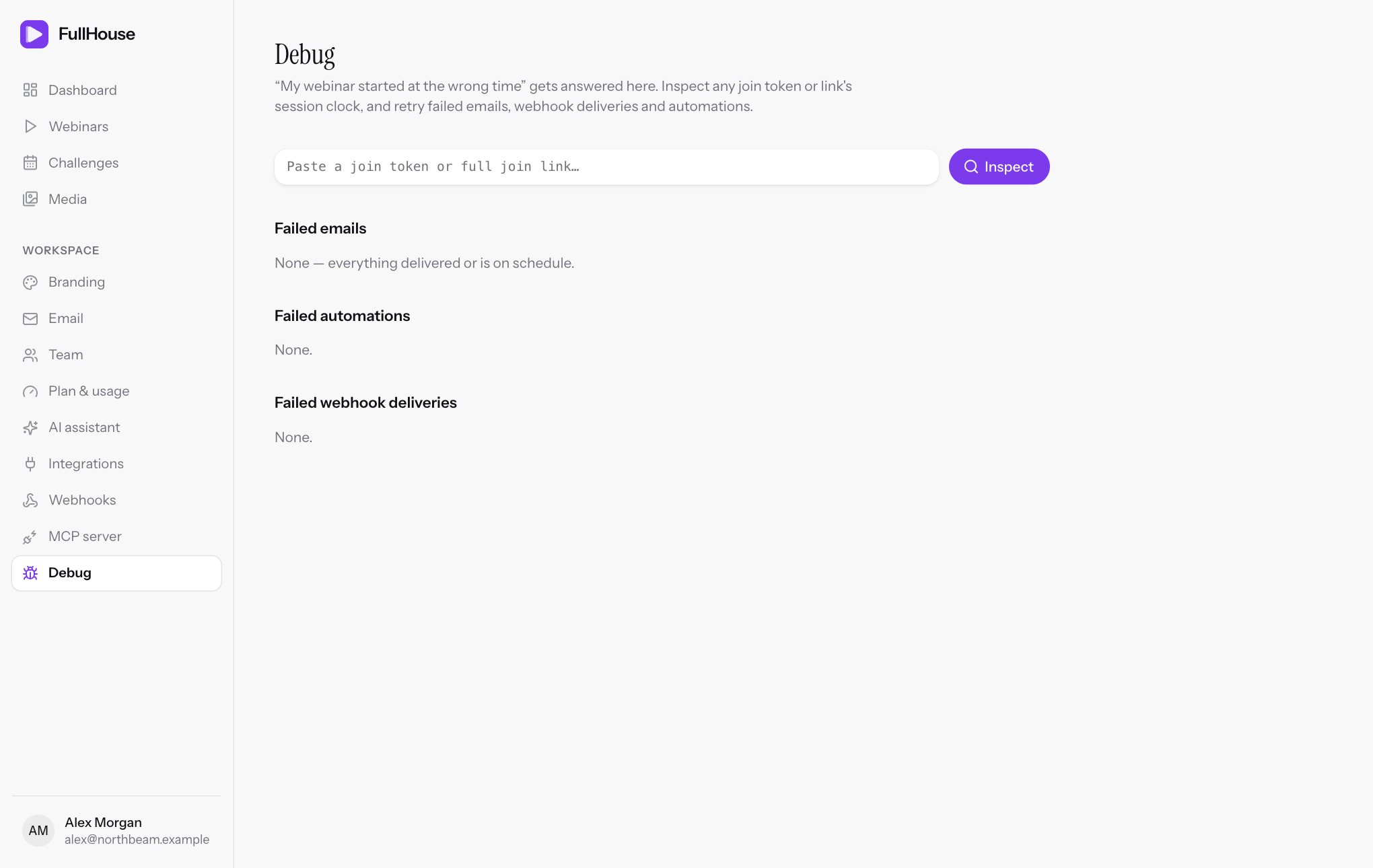
Open Workspace → Debug. The page has four parts: the inspector, Failed emails, Failed automations and Failed webhook deliveries.
Inspect one registrant
Get their link
Open the person under Registrants and copy their Personal join link.
Paste it in
Paste it into the box at the top of Debug and click Inspect. The box takes a full personal link (join, replay, thank-you or calendar) or the token on its own, which is the last part of the link after /join/.
If nothing matches, you’ll see “No registrant with that join token or link in this workspace.” The same message shows for a link from someone else’s workspace. A challenge hub link holds a different kind of token and gets this message too, so open the person in the day’s registrants instead.
What the card shows
The heading shows the person’s email. Under it are the webinar, the session number, how the session was created and its start time. The time on this line is shown in your browser’s time zone.
| Session type | Meaning |
|---|---|
specific |
A specific date you added |
recurring |
A repeating weekly schedule |
just_in_time |
A just-in-time slot that starts soon after registering |
instant |
Starts as soon as the person registers |
manual |
Not tied to a schedule rule |
See Schedule for what each type does.
The chip on the right is the person’s state right now, the same value as state in the clock below.
Read the session clock
Session clock is what FullHouse tells this person’s browser. All times are in UTC, so 2026-06-10T14:00:00+00:00 is 2pm UTC.
| Field | Meaning |
|---|---|
server_now |
The time now, according to FullHouse. |
starts_at |
When this person’s session starts. |
ends_at |
When it ends. |
duration_seconds |
The webinar’s length. |
offset_seconds |
How far into the video a viewer should be now. Stays at 0 before the start and at the full length after the end. |
state |
Where this person is. See below. |
replay.enabled |
Whether replay is on for this session. |
replay.available |
Whether the replay can be watched now. |
replay.available_at |
When the replay opens. |
replay.expires_at |
When the replay closes. Empty if it doesn’t expire. |
The room follows this clock, not the viewer’s own computer. Two people in the same session see the same point in the video, even with the wrong time set on their device.
What each state means
| State | Meaning |
|---|---|
waiting |
Before the session starts. |
live |
The session is running and this person can be in the room. |
missed |
The session is running, but it’s too late for this person to join, under your join rules. |
ended |
The session is over, and no replay is available yet or at all. |
replay |
The session is over and the replay is open. |
replay_expired |
The replay window has closed. |
canceled |
The session was canceled. |
Read the scheduled emails
Scheduled emails lists every email planned for this person, in send order, with the time it was due and any error.
| Status | Meaning |
|---|---|
pending |
Waiting for its send time. |
processing |
Being sent, waiting to retry, or held until FullHouse Send has room or finishes setting up. |
sent |
Handed to the email provider. This doesn’t guarantee it reached the inbox. |
failed |
Gave up. It appears under Failed emails, where you can retry it. |
skipped |
Deliberately not sent when its time came. The reason shows beside it. |
canceled |
Canceled before sending, for example when the person unsubscribed. |
The reasons you can see on a skipped email are:
| Reason | Meaning |
|---|---|
| Recipient unsubscribed. | They clicked unsubscribe or, on FullHouse Send, reported spam. |
| Session canceled. | The session was canceled. |
| Delivery condition not met. | The email is only for some people, and this person isn’t one of them. For example, the “Missed” follow-up doesn’t go to someone who attended. |
| Template disabled or missing. | You turned this email off on the webinar after it was scheduled. |
| Workspace suspended. | The workspace was suspended when the email was due. |
| Replay is off. | Replay was turned off before Replay available was due. |
| Replay has closed. | The replay closed before Replay available was due. |
On FullHouse Send, a sent email can also show Bounced: or Dropped: followed by a reason. That means it left FullHouse, but the recipient’s mail system refused it or it wasn’t delivered. A retry won’t help until the address is corrected, because the problem is usually the address.
Retry a failed email
Failed emails lists your 25 most recent failures: which email, who it’s for, the webinar, when it was due and the error. If there are none, you’ll see “None — everything delivered or is on schedule.”
Click Retry to try again now. The row leaves the list, and you’ll see “Email queued to send again.” If a retry is refused, the reason shows on screen.
Before you retry:
- Fix the cause first. If the sender is misconfigured, it’ll fail again.
- Check that it still makes sense. A retried email goes out now, however old it is. It doesn’t check whether a reminder is out of date, so don’t retry “starting in 15 minutes” after the session has ended.
- It uses the current wording. If you’ve edited the email since, the person gets the new version.
- It checks again whether the person should get it. If they’ve since unsubscribed, it becomes
skippedrather than sent.
There’s no retry-all button, so you retry each email separately.
What the error means
| Error | What to do |
|---|---|
| Daily FullHouse Send limit reached… | See When you hit the limit. Retry after the reset or after connecting your own provider. |
| Email provider rejected delivery (HTTP 401), (HTTP 403) or (HTTP 422) | Check your provider key and verified domain, then retry. |
| Email provider request failed. | Your provider was unreachable after three attempts. Check its status page, then retry. |
| FullHouse Send refused the message: … | The recipient was rejected, usually a bad address. Correct the address if you can. |
| No email sender is set up. Connect Resend or Mailgun in Email settings. | FullHouse Send isn’t available right now. Connect your own provider, then retry. |
| This workspace is suspended. | See Suspended accounts. |
Retry a failed automation
Failed automations lists your 25 most recent automation runs that gave up. Each row shows the rule and person, such as Kit: Registers → [email protected], then the webinar, the error and how long ago it happened. If there are none, you’ll see “None.”
Fix the cause first, then click Retry. You’ll see “Automation queued to run again.”
- Nothing is done twice. Steps that already reached the tool aren’t repeated.
- The rule’s count updates. Retrying takes one off the rule’s failed count and clears its last error. If it fails again, the count goes back up.
- The rule must be on. If it’s paused, you’ll see “This automation is paused. Turn it back on, then retry.”
See When an automation fails for what the errors mean.
Retry a failed webhook
Failed webhook deliveries lists your 25 most recent deliveries that used up their attempts, or that fell due while their endpoint was paused: the event, the HTTP status your endpoint returned if any, the error and how long ago it happened.
Click Retry to send it again, and you’ll see “Delivery queued to send again.” The same delivery is sent again with its original contents and ID, and it gets a fresh set of three attempts.
| Error | Meaning | What to do |
|---|---|---|
| Webhook returned HTTP 4xx | Your endpoint refused it. A 404 usually means the URL has changed, and a 401 or 403 that it requires a login. | Check the URL and the receiving system. |
| Webhook returned HTTP 5xx | Your endpoint had an error. | Check its logs. |
| Webhook returned HTTP 3xx | Your endpoint tried to redirect. FullHouse doesn’t follow redirects. | Use the final URL. |
| Webhook request failed. | FullHouse couldn’t connect or get a reply within 10 seconds, or the address isn’t public. | Check that the endpoint is up and responds quickly. |
| This endpoint is paused. Turn it back on, then retry. | The endpoint was paused when the delivery fell due. It didn’t use an attempt. | Turn the endpoint back on, then click Retry. |
If the endpoint is still paused when you retry, the retry is refused with that same message. Turning an endpoint back on doesn’t resend anything by itself, so retry each delivery. See Webhooks.
Diagnose common problems
“I never got my reminder”
- Inspect the registrant and find the email in the list.
- Not in the list: it wasn’t scheduled. The email may be turned off, or its send time had already passed when they registered. Someone registering 30 minutes before the start doesn’t get a 24-hour reminder.
pending: it’s not due yet. Check the time shown.sent: it left FullHouse. Ask them to check spam, and look forBounced:beside it. With your own provider, look the address up in that provider’s logs.skipped: the reason tells you why.failed: read the error, fix the cause and click Retry.
“My webinar started at the wrong time”
- Inspect the registrant and compare
starts_atwith when they expected it, remembering that it’s in UTC. - If
starts_atis what you scheduled, the session is right, and it’s probably the person’s time zone or the wording of your email. See Schedule. - If
starts_atis wrong, check your schedule and time zone.
“It says I missed it” or “the room won’t open”
Check state. waiting means it’s too early. missed means they arrived after your join window closed. canceled means the session was canceled. ended means it’s over and no replay is open. Compare server_now with starts_at and ends_at to see how early or late they were.
“My webhook isn’t firing”
- Look at Workspace → Webhooks. Is the endpoint switched on, and is that event ticked?
- Look at Recent deliveries on that page. No row means the event hasn’t happened since you set it up. Remember that some events only fire once per person. See Events.
- Look under Failed webhook deliveries here for the error.
“My CRM isn’t getting people”
Look under Failed automations here for the rule, person and error. The webinar’s Automations step also shows each rule’s number of runs, how many failed and the latest error. See Automations and When an automation fails.
Each run tries three times and then stops for that person, until you retry it here.
Related
- Registrants to find a person’s join link
- Troubleshooting for a wider list of problems
- Statuses for every status in one place